Skins' Basic Tutorial
This tutorial is an in depth guide at converting a jcink forum skin for use on a MyBB Version 1.8 forum. We will not be covering MyBB installation, plugins, or scripts in this tutorial; nor will we cover compatibilities with previous MyBB versions such as 1.6. This guide is aimed at individuals with an intermediate to advanced understanding of Jcink skinning or general coding. I will do my best to be as beginner friendly as possible, but this is not a guide to creating a new skin. A basic understanding of HTML, CSS and forum skinning is needed.
I am not a professional MyBB theme maker, nor am I professional coder in any capacity. I do this as a hobby. As such, the following tutorial will include shortcuts, misunderstandings, missing pieces, flat out wrong info, and not answer every question you have. I am sorry! I am doing my best, but I'm not perfect. Corrections welcome. Thank you!
As you build your skins, you may find that you don't need some of the things that are there by default. For this tutorial we will not remove anything from the default MyBB code unless it has to be removed for the sake of the skin. This means that there may be a lot of code leftover that is not in use by the skin.
The skin we will be using is Joss' Basic skin. This skin was designed to be used as a base for any coder to use, so please feel free to use it to help build your own beautiful skins! The MyBB version of this skin is licensed under CC BY-NC 4.0 and is strictly for personal or free distribution use only. Do not sell anything created with this base or any of the codes found on this page but do consider sharing it for free!
Tip! The first one is always the hardest. You will get frustrated. This will all seem like a whole lot. This process will take days/weeks from start to finish until you get a handle on MyBB itself. Take breaks when you need to and I promise that it gets easier once you get a little experience.
Common Variables
I am going to move this section to the bottom when I am done with the tutorial, or maybe even a separate page, but for now I'm going to leave it up here so it is out of my way. I think one of the most frustrating parts about learning MyBB skinning was that there isn't a great just list of variables you might use. I want to make something but only AFTER the skin conversion part is done. For now, this is going to be a list of the variables I am changing in the skin as I go so I can keep track. It will not be in any sort of order right now, so I'm sorry!
| Variable Conversions | ||
|---|---|---|
| Jcink | MyBB | Description |
| <% CSS %> | {$stylesheets} | CSS Stylesheets |
| <% NAVIGATION %> | <navigation> | Forum navigation bar |
| <!-- |g_id| --> | {$mybb->user['usergroup']} | Logged in user's Group ID number |
| <!-- |g_id| --> | {$post['usergroup']} | Post authors's Group ID number |
| <!-- |id| --> | {$mybb->user['uid']} | Logged in user's ID number | <!-- |id| --> | {$post['uid']} | Post authors's ID number |
| <!-- |name| --> | {$mybb->user['username']} | Logged in user's username |
| <!-- |name| --> | {$post['username']} | Post authors's username |
| <{LOGO}> | {$theme['logo']} | Url to logo image if designated in the board settings. |
Create a New Theme and Template Set
Tip! Always create new sets for your skins and do not override the default templates or themes so if you need to switch between skins for troubleshooting you will have a functioning skin option.
In the Admin CP, navigate to Templates & Style -> Templates -> Add Set
Name your template set.
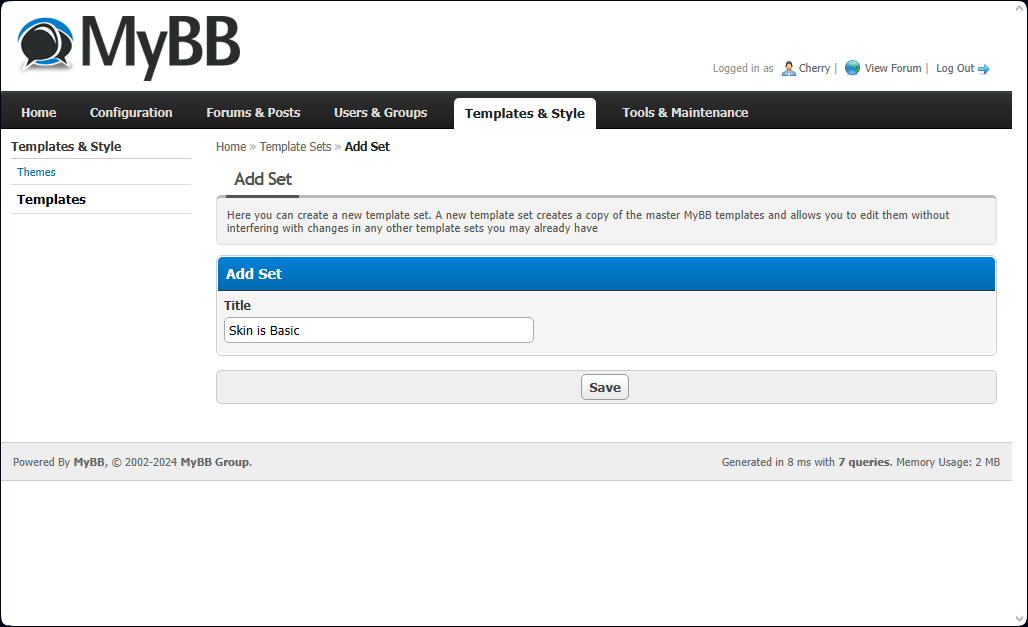
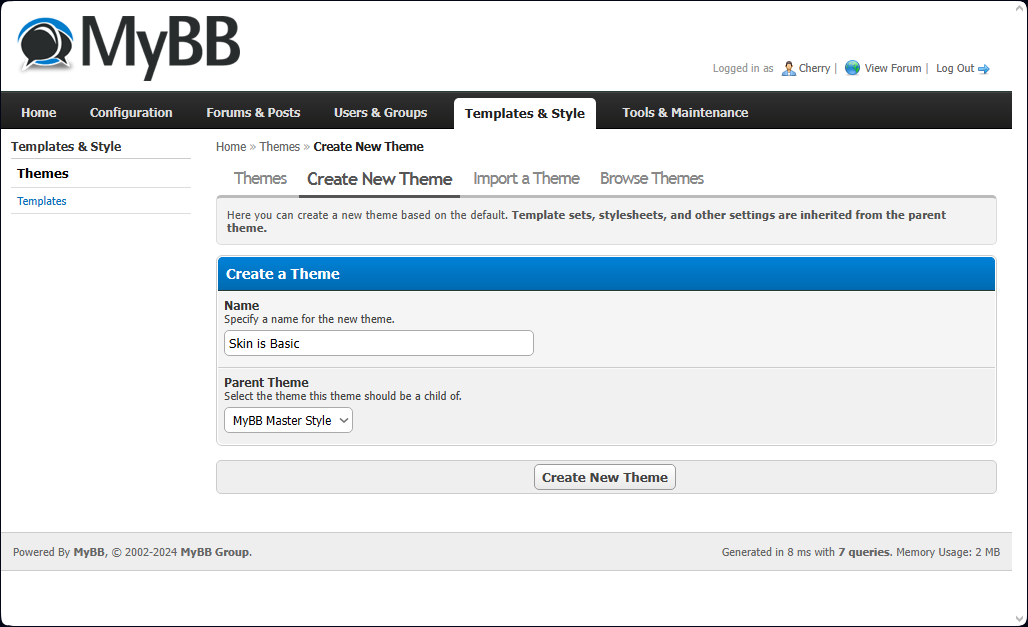
Navigate to Templates & Style -> Themes -> Create New Theme
Name your stylesheet set for the skin and the parent theme. We will use MyBB Master Style for this tutorial.
Tip! The Parent Theme is the set of stylesheets that will be copied to create the new set. If any stylesheet is left blank in the new set, the Parent Theme stylesheet will be used instead.
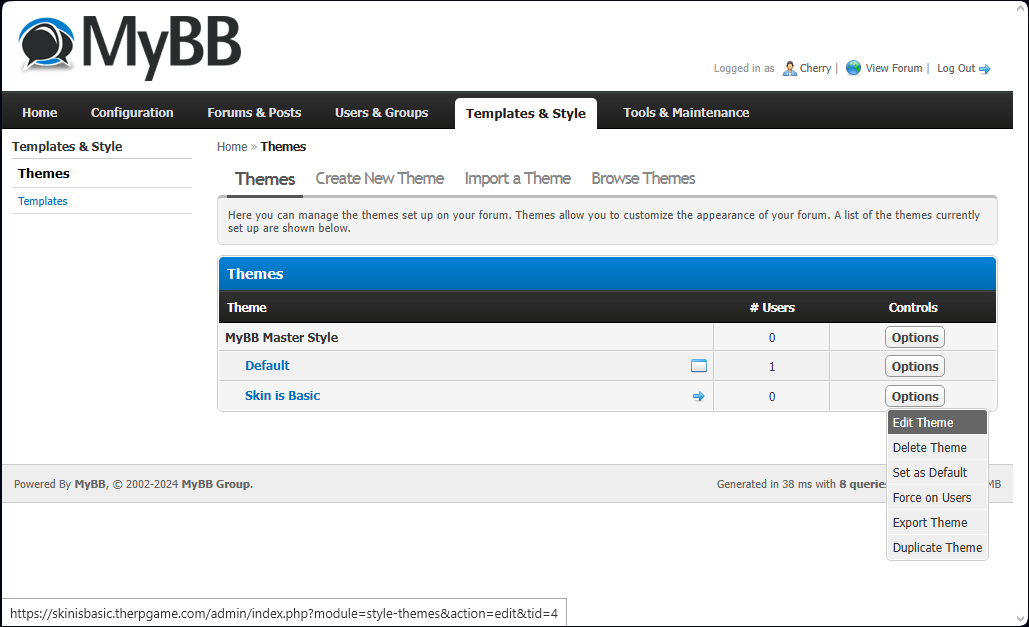
Navigate to Templates & Style -> Themes
Click "Options" for your new Theme and select "Edit Theme."
Tip! Selecting the arrow on this screen will make the new theme the default for all users.
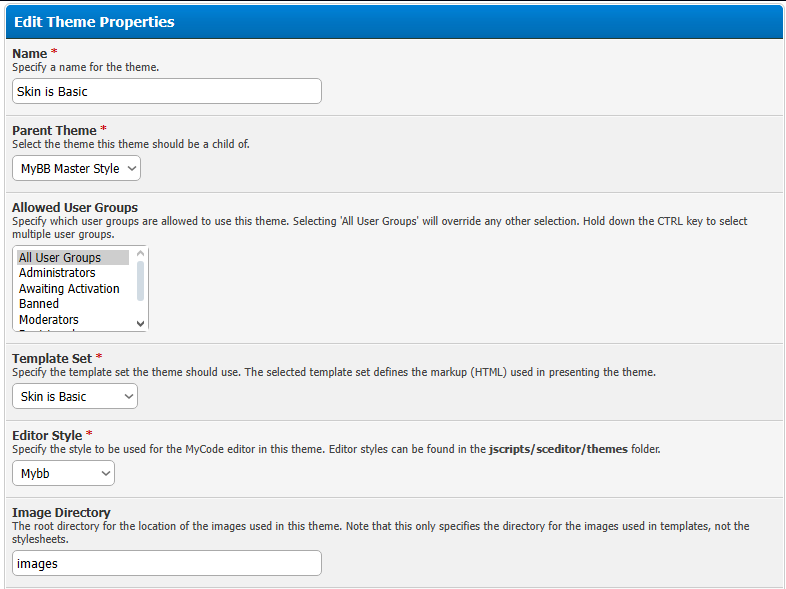
Under "Edit Stylesheets" you will see a list of the default stylesheet options. Below that is the "Edit Theme Properties" section. Scroll down to the "Template Set" option and select your new Template Set and click Save Theme Properties.
CSS Stylesheets
There are seven default stylesheets that are generated when you create a new theme off of the MyBB Master Style parent. These will contain the inherited contents by default. If any of these stylesheets have their contents removed and are left blank, the parent skin's version will be used instead. Below are all of the stylesheets in the default order that they load on the page:
| global.css | Attached to all pages |
| usercp.css | Attached to usercp.php and private.php |
| modcp.css | Attached to modcp.php |
| star_ratings.css | Attached to forumdisplay.php and showthread.php |
| showthread.css | Attached to showthread.php |
| thread_status.css | Attached to usercp.php, forumdisplay.php and search.php |
| css3.css | Attached to all pages |
Tip! Adding the CSS can be done before or after editing the HTML templates. I prefer to add the skin's CSS in the beginning and tweak things as I add the HTML, especially since some skins utilize CSS for their HTML to even work right.
Navigate to Templates & Style -> Themes -> global.css
I prefer to use the Advanced Mode of the theme editor over the Simple Mode. The Simple Mode allows you to navigate to certain selectors and contains enough options that it may be helpful for some users. In this case, we are going to need to go into the Advanced Mode. Here, we will copy and paste the CSS from Joss' Basic skin to the bottom of the global.css coding. For now, I am not going to worry about removing or merging any of the CSS, so by placing it at the bottom of the code it will overwrite anything that was defined before it while also preserving the MyBB CSS that keeps the stuff working that isn't covered by the Jcink skin.
I am not going to go through the process of cleaning up all of the CSS in this tutorial, but that is going to be an important step to making sure everything looks right. The downloadable version of the Skin is Basic will have my edits, but I will not be fully removing all of the bloat because honestly I am a lazy hobby coder with bad habits. Below are a couple of examples comparing some basic differences in the CSS that will need to be fixed.
| Default | Joss' Basic |
In these examples, the default versions should be deleted all together because Joss' Basic skin doesn't use all of the same properties, which would cause a conflict with the design such as skewed spacing. Other CSS changes that need to be made will become apparent as we add the various HTML pieces to the templates, so I will elaborate more on some of those as they come up in the process.
DOCTYPE and Headerinclude
Unlike on Jcink, the DOCTYPE and the the global head section of MyBB skins are not located in the header. If you leave these sections in the header template you may experience errors or conflicts. This template is automatically included on all pages and does not require the use of a template variable.
We are going to look at the following code from the global wrapper of Joss' Basic skin.
Navigate to Templates & Style -> Templates -> Manage Templates -> Ungrouped Templates -> htmldoctype
In this template is where the html DOCTYPE should go. I am going to leave the default setting in place, but if you have issues with your code or there is a special DOCTYPE needed, you would change it here.
In the skin we are converting, this is where we would put the following line:
<!DOCTYPE html>
Navigate to Templates & Style -> Templates -> Manage Templates -> Ungrouped Templates -> headerinclude
This template is where we will put anything that belongs between the <head></head> on every page of the forum such as the meta data, stylesheets, and javascripts. We do not need to include scripts here that do not need to be called on every page. In other templates, this is included by using the {$headerinclude} template variable. It will primarily live in the header template.
Some of the things from Joss' skin can be left out such as the title since that is located in the individual templates. Let's look at the code and figure out what is needed and what we can leave behind. Red are the lines we don't need for this template. Green are what we will keep.
<!DOCTYPE html> We added this to DOCTYPE.

<html>

    <head> These will be handled in the other templates, so they do not belong in headerinclude.

<meta name="viewport" content="initial-scale=1.0; maximum-scale=1.0; user-scalable=0;"/>

<link href="https://fonts.googleapis.com/css2?family=Montserrat:wght@100;200;300;400;500;600;700;800;900&family=Palette+Mosaic&family=Raleway:wght@100;200;300;400;500;600;700;800;900&display=swap" rel="stylesheet">

	<title>Joss Is Basic</title> Title structure on MyBB is handled in the other templates. If you want to remove all of those and use one title for the whole site you could keep it here, but we are going to remove it.

	<% CSS %> The MyBB version of this is {$stylesheets}.

	<% JAVASCRIPT %> There is not a MyBB version of this template.

<script type="text/javascript" src="https://files.b1.jcink.com/html/jquery-1.7.2.min.js"></script> This will interfere with MyBB javascripts, so it is best to remove it.

<script src="https://static.tumblr.com/1vwpqwc/Kixmls5t4/jquery.style-my-tooltips.js"></script>


   </head> This will be handled in the other templates, so it does not belong in headerinclude.
Tip! It is best if you can host your own javascript and stylesheets. When you upload a file or image to your webhost, you can use {$mybb->asset_url} to replace the site url (https://urltoyoursite.whatever). This helps make it so that links do not need to changed every time the skin is used on a new site. There is a different variable to be used when making links in general: ({$mybb->settings['bburl']}).
Example:
Instead of https://urltoyoursite.whatever/myscript.js, use {$mybb->asset_url}/myscript.js
Instead of https://urltoyoursite.whatever/showthread.php?tid=1, use {$mybb->settings['bburl']}/showthread.php?tid=1
The highlighted portions below are all that we will keep from the header for this template. It is best not to edit or remove anything from the default MyBB headerinclude unless you are an advanced user. These codes and lines are often critical to the functions of MyBB, such as inline moderation.
<link rel="alternate" type="application/rss+xml" title="{$lang->latest_threads} (RSS 2.0)" href="{$mybb->settings['bburl']}/syndication.php" />

<link rel="alternate" type="application/atom+xml" title="{$lang->latest_threads} (Atom 1.0)" href="{$mybb->settings['bburl']}/syndication.php?type=atom1.0" />

<meta http-equiv="Content-Type" content="text/html; charset={$charset}" />

<meta http-equiv="Content-Script-Type" content="text/javascript" />

<meta name="viewport" content="initial-scale=1.0; maximum-scale=1.0; user-scalable=0;"/>

<link href="https://fonts.googleapis.com/css2?family=Montserrat:wght@100;200;300;400;500;600;700;800;900&family=Palette+Mosaic&family=Raleway:wght@100;200;300;400;500;600;700;800;900&display=swap" rel="stylesheet">

<script type="text/javascript" src="{$mybb->asset_url}/jscripts/jquery.js?ver=1823"></script>

<script type="text/javascript" src="{$mybb->asset_url}/jscripts/jquery.plugins.min.js?ver=1821"></script>

<script type="text/javascript" src="{$mybb->asset_url}/jscripts/general.js?ver=1827"></script>


{$stylesheets}

<script src="https://static.tumblr.com/1vwpqwc/Kixmls5t4/jquery.style-my-tooltips.js"></script>

<script type="text/javascript">

<!--

	lang.unknown_error = "{$lang->unknown_error}";

	lang.confirm_title = "{$lang->confirm_title}";

	lang.expcol_collapse = "{$lang->expcol_collapse}";

	lang.expcol_expand = "{$lang->expcol_expand}";

	lang.select2_match = "{$lang->select2_match}";

	lang.select2_matches = "{$lang->select2_matches}";

	lang.select2_nomatches = "{$lang->select2_nomatches}";

	lang.select2_inputtooshort_single = "{$lang->select2_inputtooshort_single}";

	lang.select2_inputtooshort_plural = "{$lang->select2_inputtooshort_plural}";

	lang.select2_inputtoolong_single = "{$lang->select2_inputtoolong_single}";

	lang.select2_inputtoolong_plural = "{$lang->select2_inputtoolong_plural}";

	lang.select2_selectiontoobig_single = "{$lang->select2_selectiontoobig_single}";

	lang.select2_selectiontoobig_plural = "{$lang->select2_selectiontoobig_plural}";

	lang.select2_loadmore = "{$lang->select2_loadmore}";

	lang.select2_searching = "{$lang->select2_searching}";


	var templates = {

		modal: '{$jsTemplates['modal']}',

		modal_button: '{$jsTemplates['modal_button']}'

	};


	var cookieDomain = "{$mybb->settings['cookiedomain']}";

	var cookiePath = "{$mybb->settings['cookiepath']}";

	var cookiePrefix = "{$mybb->settings['cookieprefix']}";

	var cookieSecureFlag = "{$mybb->settings['cookiesecureflag']}";

	var deleteevent_confirm = "{$lang->deleteevent_confirm}";

	var removeattach_confirm = "{$lang->removeattach_confirm}";

	var loading_text = '{$lang->ajax_loading}';

	var saving_changes = '{$lang->saving_changes}';

	var use_xmlhttprequest = "{$mybb->settings['use_xmlhttprequest']}";

	var my_post_key = "{$mybb->post_code}";

	var rootpath = "{$mybb->settings['bburl']}";

	var imagepath = "{$theme['imgdir']}";

  	var yes_confirm = "{$lang->yes}";

	var no_confirm = "{$lang->no}";

	var MyBBEditor = null;

	var spinner_image = "{$theme['imgdir']}/spinner.gif";

	var spinner = "<img src='" + spinner_image +"' alt='' />";

	var modal_zindex = 9999;

// -->

</script>
Header Templates
The header template variable is {$header}. The header is placed just after the opening <body> tag. So for this template we are going to look at the board wrapper code starting just after the body tag all the way to the <% BOARD %> Jcink variable.
The MyBB header template has five template variables that only work when used in {$header}. The most important of these variables for the header is the {$welcomeblock}. The various welcomeblock templates eliminate the need to use CSS to hide admin and moderator menus, although they may seem more tedious at first. The menu variables are links most people hide on Jcink skins or insert in another place. These are usually templates because there are settings in the Admin CP that effect whether or not they show on the site or to certain users. If this functionality is not important to you, these can be left out of the header entirely.
| {$menu_portal} | header_menu_portal | HTML to display the link to the Portal. {$mybb->settings['bburl']}/portal.php |
| {$menu_search} | header_menu_search | HTML to display the link to the Search. {$mybb->settings['bburl']}/search.php |
| {$menu_memberlist} | header_menu_memberlist | HTML to display the link to the Member list. {$mybb->settings['bburl']}/memberlist.php |
| {$quicksearch} | header_quicksearch | HTML to create a search bar with an input and a button. |
| {$welcomeblock} | header_welcomeblock_guest | The guest version of the welcomeblock. |
| {$loginform} | header_welcomeblock_guest_login_modal | The login form in the guest welcomeblock. |
| {$loginform} | header_welcomeblock_guest_login_modal_lockout | A lockout error for the guest welcomeblock's login form. |
| {$welcomeblock} | header_welcomeblock_member | The logged in member version of the welcomeblock. |
| {$admincplink} | header_welcomeblock_member_admin | HTML to display the link to the Admin CP. Contents of this template only appear to admin users. {$mybb->settings['bburl']}/{$admin_dir}/index.php |
| {$buddylink} | header_welcomeblock_member_buddy | HTML to display the link to open a modal displaying the buddy list. |
| {$modcplink} | header_welcomeblock_member_moderator | HTML to display the link to the Mod CP. Contents of this template only appear to moderator users. {$mybb->settings['bburl']}/modcp.php |
| {$pmslink} | header_welcomeblock_member_pms | HTML to display the link to the private messages and display a message counter. |
| {$searchlink} | header_welcomeblock_member_search | HTML to display links to View New Posts and View Today's Posts. $mybb->settings['bburl']}/search.php?action=getnew, {$mybb->settings['bburl']}/search.php?action=getdaily |
| {$usercplink} | header_welcomeblock_member_user | HTML to display the link to the User CP. {$mybb->settings['bburl']}/usercp.php |
Looking at the header code, we need to first compare the two and see what information we need to salvage, if any, from the default template before we replace it with the Joss' Basic code. We will need to update the links in the Joss' Basic skin to use {$mybb->settings['bburl']} in replacement of index.php and to change them to the MyBB url format. For example: {$mybb->settings['bburl']}/showthread.php?tid=1
Tip! Use a text editor, Windows Notepad, TextEdit or some other software to make these comparisons and adjustments. Avoid using the editor in the AdminCP if you are prone to getting tabs mixed up and don't want to risk not having a backup in case you save the wrong code in the wrong template, like me. Once the skin is setup, you can go back to using AdminCP editor primarily.
Starting with the top bar, we need to replace <% NAVIGATION %> with <navigation>. MyBB styles the forum navigation bar a little differently than Jcink including the separators, so we will need to edit the templates to make it behave like Joss' Basic.
Tip! MyBB uses the term bit on smaller template fragments designed to manage the structure of elements that repeat within the code. The wrapping bit template code remains consistent while the dynamic content inside changes depending on what’s being displayed (e.g., links in the navigation nav_bit, posts in a thread postbit, or even forum rows forumbit_depth2_forum).
To match Joss' Basic, we are going to leave the {$sep} and {$activesep} templates empty. To be lazy, we are also going to delete the navigation class in the nav template and replace it with id="navstrip" to match the Jcink skin. If we leave the class on there it will inherit some CSS we don't want to sift through so it is best to remove it. We will also remove the span in the nav_bit_active and replace it with a link. Alternatively, you could leave this template alone and add span.active to the css with #navstrip a in global.css, but some people may be used to the functionality of the active page being a link, so I am going to preserve that.
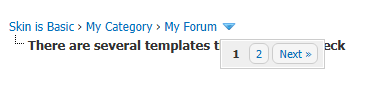
The nav_dropdown is a bit of strange one. For most cases, you could remove it and not miss it. When you are looking at a thread in the forum that has a lot of threads in it, this little icon pops up and is pagination for the forum the thread is in. I think it is a bit confusing for most rp applications to have something like that in the navigation menu, so we are going to just leave it empty.
In the default theme, the following code produces the top bar that contains the logo and the link menu. Most skins will have a link menu built in elsewhere, so this is MyBB's equivalent to the #submenu class that is often hidden. I chose to remove this menu from Skin is Basic, but below are some examples of how we would need to edit the templates to match the Joss' Basic skin.
Tip! Miscellaneous Templates -> misc_help and related templates could be skinned and coded to work as a (searchable) guidebook that admin can access and edit from the AdminCP via Configuration -> Help Documents without having to fuss directly with the code to make updates.
For the link variables {$menu_portal}, {$menu_calendar}, {$menu_memberlist}, and {$menu_search} to work with Joss' Basic, we need to remove the <li> code around the links. We are also going to remove the CSS class and replace the text with the uppercase name to match the other links in the menu. If you have a more complicated link menu in the skin you are converting, be sure that the template includes all of the containing html that goes with that link, if needed. For example, if the link is wrapped in a <span> tag, you would include that in the template so that if the admin turns off the feature there isn't an empty <span> still taking up space.
Below are a couple of examples of how we are going to update these links. There will be several of these types of template edits throughout the skinning process, so in the future I will only be showing the converted HTML.
Tip! Anytime you see {$lang->...} in a template, it is inserting default text from the language pack. This is critical for the MyBB language setting to work properly, but you are welcome to replace that text with anything you want or edit the language files directly.
The welcomeblock templates are responsible for the two bars just below the logo and link menu. This section of the header is where a skin might have the logged in user's avatar with their private message count and link to the UserCP.
The welcomeblock portion of Joss' Basic skin is the userlinks section, so we now need to go through and update all of the template variables from Jcink to MyBB. There are a lot of these variables possible, so there isn't a master list anywhere which can be frustrating when just learning. You can learn more about the variables here but in this particular case we are going to be using $mybb->user['xxx'] style variables. In the global.css stylesheet, I am going to remove the CSS for the group classes since we don't need to use it to control visibility, but I will leave it there in case someone wants to style the links per group.
Tip! MyBB does not have subaccounts or alerts by default. These functions require plugins and will need additional styling not covered here.
Tip! You can choose to keep the link format and #quick_login div from the default template if you would prefer the login form to be a modal window instead of inline.
Tip! You may not want to use the following coding if you are keeping the modal window.
Now we can plug the newly updated variables into the Joss' Basic coding to create our new header template.
Navigation
Navigate to Templates & Style -> Templates -> Manage Templates -> Navigation Templates
<navigation>
nav
Template variable to display the forum navigation link bar.
{$nav}
nav_bit
HTML to display each link in the forum navigation. {$navbit['url']}
{$navbit['name']}
none
Displays the name of the forum that is being linked.
{$sep}
nav_sep
HTML to display the standard separator.
{$activesep}
nav_sep_active
HTML to display the separator for the active page.
{$activebit}
nav_bit_active
HTML to display the active link/current page in the forum navigation.
none
nav_dropdown
An icon that appears in the navigation menu that opens the pagination menu for the forum. It only appears on thread view.
nav
nav_bit
nav_bit_active
Link Templates

Templates -> Manage Templates -> Header Templates -> header_menu_calendar
Default
Converted
Templates -> Manage Templates -> Header Templates -> header_menu_portal
Default
Joss' Basic
Welcomeblock

header_welcomeblock_member
header_welcomeblock_member_pms
header_welcomeblock_member_user
header_welcomeblock_member_admin
header_welcomeblock_member_moderator
header_welcomeblock_guest
header_welcomeblock_guest_login_modal
header_welcomeblock_guest_login_modal_lockout
Final Header Template
Footer Tempate
Before we move on to the board styling itself, we are going to finish converting the Jcink wrapper by addressing the footer now. This will help us avoid any weird conflicts while troubleshooting the board styling because there are extra closing </div> codes in the default foot compared to our new header.
There are a lot of additional variables available in the footer than listed here. These variables are linked to a footer template.
| {$lang_select} | footer_languageselect | HTML to display the language select dropdown, if enabled. |
| {$lang_options} | footer_languageselect_option | HTML to display the available language options, if enabled. |
| {$showteamlink} | footer_showteamlink | HTML to display the link to the Contact Us form. showteam.php |
| {$theme_select} | footer_themeselect | HTML to display the theme select dropdown, if enabled. |
| {$theme_options} | footer_themeselector | HTML to display the available theme options, if enabled. |
| {$contact_us} | footer_contactus | HTML to display the link to the Contact Us form. {$mybb->settings['contactlink']} |
To start converting the footer we are going to take a look at the remainder of the board wrapper code from Joss' Basic skin below <% BOARD %>.
We will remove a lot of the scripts here because they aren't compatible with the structure of MyBB or they will be handled elsewhere in the templates. It is possible to alter Jcink based scripts to work with MyBB. I am not going to go over that in this tutorial since they are not my scripts to share. After removing the pieces we don't need, I decided to keep the link menu and give it the same CSS as the navistrip. I also added line-height: 12px; to .copyright because the spacing was a bit much for me.
global.css
Find #navstrip a and replace with the following:
footer_themeselector
Footer Template
Index Page
Navigate to Templates & Style -> Templates -> Manage Templates -> Index Page Templates
The primary focus for us on the Index templates will be the board stats, but you could use this template for special banners meant for the index, to put a popup for first time visitors, or even move the banner here from the header so that it only shows on the index.
| none | index | The homepage of the forum. |
| {$birthdays} | index_birthdays | HTML to display the member birthdays if enabled. |
| {$bdays} | index_birthdays_birthday | HTML to display the member names and age. |
| {$comma} | none | Separator for the birthdays that only shows as needed. |
| {$bdayuser['profilelink']} | none | Template variable that displays the member's name as a link to their profile. |
| {$age} | none | Template variable that displays the member's age depending on user settings. |
| {$boardstats} | index_boardstats | HTML to display the board stats area. |
| {$logoutlink} | index_logoutlink | HTML to display a log out link. |
| {$forumstats} | index_stats | HTML to display the forum stats such as number of members, threads, posts, most users online, and newest member. |
| {$statspage} | index_statspage | HTML to display a link to the more in depth forum statistics page. |
| {$whosonline} | index_whosonline | HTML to display the who is online now area. |
| {$onlinemembers} | index_whosonline_memberbit | HTML to display the member's name as a link to their profile. |
| {$invisiblemark} | index_whosonline_memberbit | Template variable that I'm not sure what it does so I leave it there. |
Board Stats
I'm going to be honest here for a second and say that the board stats are frustrating me. You need to use a plugin to get the same functionality as Jcink, so a lot of the options just aren't there. This whole area will need a rework. I am going to skip this section for my own sanity right now and come back to it when I am less cranky about it.
Forum Bit Templates
The Forum Bit Templates are a the parts that make up a lot of the forum related headers and pieces. This includes Category Headers and Forum Rows. We will not go into all of the templates in this section, but we will take a look at the ones we will need to edit for the purpose of the skin conversion.
Navigate to Templates & Style -> Templates -> Manage Templates -> Forum Bit Templates
| none | forumbit_depth1_cat | HTML to display a category of forums on the index. |
| unknown | forumbit_depth1_cat_subforum | HTML to display sub forums of a category on the index. (This template can be safely ignored. Sadrienne discovered it is likely a depreciated template that is not called by the 1.8 MyBB version.) |
| unknown | forumbit_depth1_forum_lastpost | HTML to display last post of a category on the index. (This one is similar to the cat_subforum in that it does not seem to be a template in use by MyBB 1.8 MyBB.) |
| none | forumbit_depth2_cat | HTML to display a category of forums if the categories' parent is a forum on forumdisplay.php. |
| {$sub_forums} | forumbit_depth2_forum | HTML to display the forum row in the forumbit_depth1_cat template on index.php. |
| {$lastpost} | forumbit_depth2_forum_lastpost | HTML to display last post in a forum on forumdisplay.php. |
| none | forumbit_depth2_forum_lastpost_hidden | HTML to display replacement text for the last post in a forum on forumdisplay.php if the content is hidden from the user. |
| none | forumbit_depth2_forum_lastpost_never | HTML to display replacement text if there are no posts in a forum on forumdisplay.php. |
| {$unapproved['unapproved_posts']} | forumbit_depth2_forum_unapproved_posts | HTML to display unapproved posts. |
| {$unapproved['unapproved_threads']} | forumbit_depth2_forum_unapproved_threads | HTML to display unapproved threads. |
| {$forum_viewers_text} | forumbit_depth2_forum_viewers | HTML to display the viewer count of a forum if Show x viewing forum is enabled. It is disabled by default. |
| forumbit_depth3 | I don't know this one. Will dig more later. | |
| {$statusicon} | forumbit_depth3_statusicon | Status icon for use in forumbit_depth3. |
| {$modlist} | forumbit_moderators | HTML to display the list of moderators assigned to the forum. |
| {$moderators} | forumbit_moderators_group | HTML to display the member groups of moderators assigned to the forum. |
| {$moderators} | forumbit_moderators_user | HTML to display the links to the moderator's profiles. |
| {$sub_forums} | forumbit_subforums | HTML to display the link menu of sub forums. |
Category Headers
We are going to get started with the forumbit_depth1_cat so we need to grab the Category Headers code from Joss' Basic.
forumbit_depth1_cat
We could choose to just leave the category description and collapsible switch off like in the Joss' Basic, but I feel like some people might really like these functions so I am going to include them. Joss' Basic and MyBB don't really line up perfectly which means we will need to make some adjustments to the CSS. You can use a Font Awesome symbol in place of the Unicode character I entered. The CSS I used is designed to turn a symbol upside down, but you could replace the transform with a different symbol content if you would like.
| global.css | |
| Default | Converted |
Expander
Before we move on, I want to explain the collapsible category a little bit more. One option that you have is to upload images to your file host at /images/collapse.png and /images/collapse_collapsed.png if you would like to replace the images and use the original coding. Otherwise, this version allows you to use pseudo elements to insert Unicode or even Font Awesome symbols.
If you remove the src, id, class, alt, or title from this code it may break the functionally. You may add additional classes if you would like. In the CSS we can target the different states: .expander[alt~="[+]"] is for the collapsed state and .expander[alt~="[-]"] is for expanded. The MyBB script also looks at src="{$theme['imgdir']}/" to target the toggle, so it is needed even though we aren't using an image. We could also just use our own script if we want, but this one is built in so why not put it to use?
When it comes to the area that is expected to collapse, in this case the forums in the category, you need to make sure you have the style and id on the div surrounding the area like below. The style="{$expdisplay}" part controls whether or not the collapsed state is remembered when someone leaves or refreshes the page. The id="cat_{$forum['fid']}_e" part is what links it to the image/symbol where we put id="cat_{$forum['fid']}_img" to know which area to collapse.
Forum Rows
Now we are going to move to the forumbit_depth2_forum template to get started on the forum row that shows on the index. We will need to look at the Forum Row template from Joss' Basic.
forumbit_depth1_cat
One of the things that I've always disliked is having to remember how to format the descriptions, so I decided to include the <forumdesc> in this template and use a script to pull the links out of the description. You are welcome to exclude this and put both in the descriptions like you would on Jcink. Below is the script that allows us to skip the use of <forumdesc> in every single descript of every single forum and still preserves Joss' Basic skin grid. I decided to put it in the index and forumdisplay templates only to avoid it running on pages it isn't needed, but you could put this on the headerinclude if you wanted.
index & forumdisplay - place inside <head>
Lastpost
The Lastpost templates allow you to customize the last post section based on whether the forum has any posts, is empty, or is hidden. We are going to focus on the forumbit_depth2_forum_lastpost template first.
forumbit_depth2_forum_lastpost
I did not love the way the empty and hidden options looked with the default div that centered them, so I removed the div and bolded the text instead. You could fancy it more if you'd like!
forumbit_depth2_forum_lastpost_never
If you would rather have it look like Jcink, you can use the following:
forumbit_depth2_forum_lastpost_hidden
Forum Display Templates
Many of these templates can be left alone, so try not to get discouraged looking at them all. Whenever possible, try to take the time to update these templates if needed rather than just replace them with a plain link. We are not going to go through every single one of these in this tutorial, but we will touch on everything needed for this skin conversion. The forumdisplay template is the coding that appears when you are viewing the list of subforums and threads in a forum, so we need to start with converting the Jcink Topic List Headers and Topic Row templates.
Rather than list every single one of these templates, I am going to only list the ones we need to touch for this skin conversion. Hopefully the experience you have gained with the other templates thus far can help you to dive deeper into the things we don't cover on your own. (I will be making a separate page that has all of the templates and their descriptions on it, but I will overwhelm myself and never finish the tutorial if I touch on every single aspect right now.)
Navigate to Templates & Style -> Templates -> Manage Templates -> Forum Display Templates
This set of templates is the overall structure of the forum display page. It is the wrapper, so to speak, for the thread list.
| none | forumdisplay | HTML to display the threads in a forum. |
| {$moderatedby} | ||
| {$usersbrowsing} | ||
| {$rules} | ||
| {$subforums} | ||
| {$threadslist} | ||
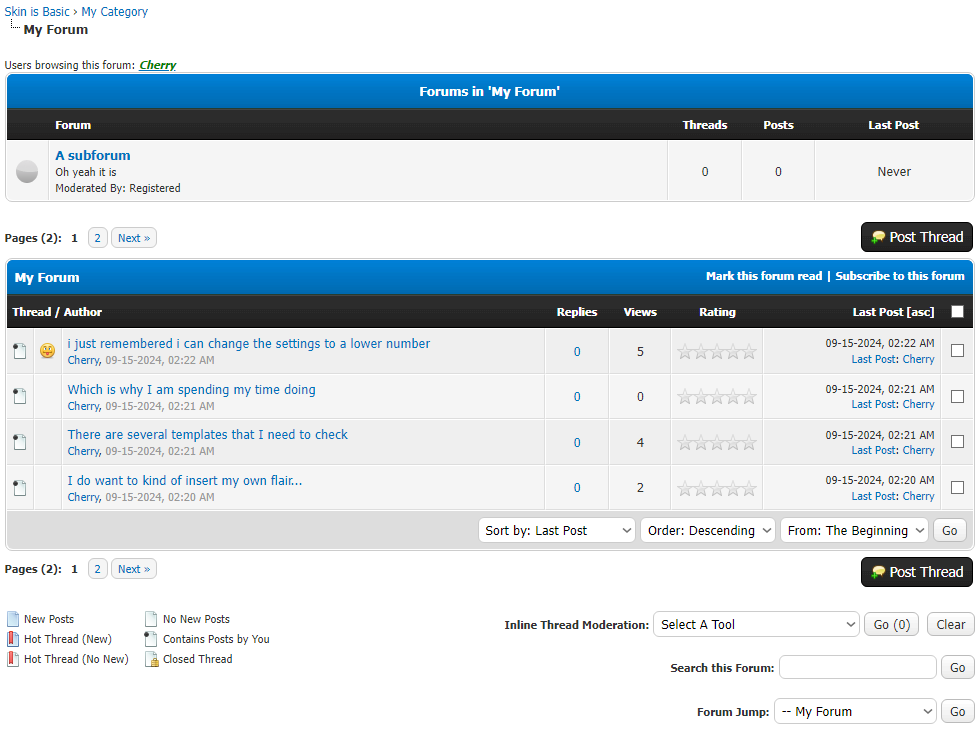
One of the benefits of using MyBB over Jcink in this instance is that you can control how the forum view looks independent of the other pages. You can control of the page from the head to toe. This is also a bit of curse because it means that we have to pay attention to a few extra pieces that Jcink builds in for your convenience. We are going to start with the parts that Joss' Basic skin has for us and then tweak what is left over.
These will be styled using the forum row css that we put in before, but we do need to take it out of the table. In keeping with the theme of the html in the skin, I added a unique subforumlist html element wrapping the subforums so that they can be stylized with css if needed. You could just leave {$forums} in there alone as well.
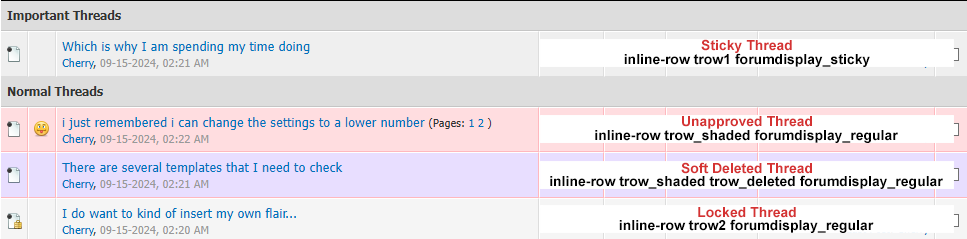
We are going to switch things up right now and rather than work on the outside inward we want to start with the forumdisplay_thread first so that the table coding we are replacing doesn't make it harder to troubleshoot in the forumdisplay_threadlist template. Lets grab the Topic Row from Joss' Basic and work our magic. One downside to MyBB vs Jcink in this template is that topic descriptions are not available by default and require a plugin. For the sake of the grid I am going to leave it there and plop the forum marker and thread pagination in there for now.
You will notice that on the topic row we added a few classes. Because we added the {$bgcolor}, I am going to empty out some css so that it doesn't intefere with our design and get rid of the border on the shaded rows. I am going to leave the shaded and deleted backgrounds as is but you are welcome to edit them to fit your needs!
At this point things are going to start looking rough as we add code, mainly due to the fact that a lot of these little MyBB templates use a table structure that we aren't using anymore. This means that it isn't going to be as instantly satisfying and pop into place neatly. For starters, that tricky {$modbit} is the first thing we are going to put right.
MyBB has some inline moderation tools built into the theme using javascript. There are some elements of it that I don't fully understand so I'm not going to go into depth on the topic. It will require some attention from us though, so here are the template changes I made to make this work with Joss' Basic skin. If you find that things are not working right, check other javascript conflicts. MyBB has a function that could highlight the rows when you select them, but it broke somewhere along the way. Since Jcink doesn't usually do that, I'm going to just leave it alone for now but I will revisit it in future versions of the Skin is Basic xml.
Most people that are coming from Jcink are going to be used to certain functions being in certain places, and the select all button might be one of them. MyBB uses a checkbox for this that you could put wherever you want, but I went ahead and recreated the button functionality that you would get from Jcink, sort of. Below the html is the css that will need to be added for the button to work properly.
The Threadlist is probably most comparable to the Jcink Topic List Headers template, but it is much more complex than that. Everything under the subforums to the footer is setup in this template.
Notable MyBB Variables or Codes
We are going to keep the classes tborder and clear on the container to make sure the inline moderation has the best chance at working. It is unclear how important the tborder is, but we are keeping it anyway. Since we have to edit out some bits, I added a margin at the bottom.
In order to get the html for this, I just inspected the button on the Jcink version and made sure to copy the structure. This makes it a little easier for people familiar with Jcink themes. We will do the same for a few more of the elements on the page. Alternatively, you could keep much of the the original structure and just style it, but by copying the structure it makes the Skin is Basic skin a base you can use and then build on when copying other Jcink skins over (that you aren't selling, please).
This will take the rounded corners off of the dropdown menus and the like. You could leave this if you want and just add the other bits that need to be rounded.
Subforums
forumdisplay_subforums
Add to global.css
Thread
forumdisplay_thread
Remove the following in global.css
Edit the following in global.css
forumdisplay_thread_modbit
Inline Moderation
forumdisplay_inlinemoderation_selectall
forumdisplay_inlinemoderation_col
global.css for forumdisplay_inlinemoderation_col
forumdisplay_inlinemoderation
forumdisplay_inlinemoderation_selectall
Threadlist
{$multipage}
Displays the pagination.
{$newthread}
HTML to display the new thread button.
misc.php?action=markread&fid={$fid}{$post_code_string}
{$lang->markforum_read}
{$addremovesubscription}{$clearstoredpass}
Inserts the subscription function and required security feature.
{$orderarrow[' ']}
subject, replies, views, lastpost
{$ratingcol}
{$inlinemodcol}
{$selectall}
{$announcementlist}
{$threads}
{$forumsort}
{$lang->new_thread}
{$lang->new_hot_thread}
{$lang->hot_thread}
{$lang->no_new_thread}
{$lang->posts_by_you}
{$lang->closed_thread}
{$inlinemod}
{$searchforum}
{$forumjump}
forumdisplay_threadlist
Edit in global.css
forumdisplay_newthread
forumdisplay_usersbrowsing
Remove from css3.css
Remove from css3.css
Remove from css3.css
forumdisplay_forumsort
Ungrouped Templates -> gobutton
forumdisplay_threadlist_prefixes
forumdisplay_searchforum
Forum Jump Templates -> forumjump_advanced
Edit in global.css
Remove from global.css
Edit in global.css
Multipage Pagination Templates -> multipage
Multipage Pagination Templates -> multipage_page_current
forumdisplay_sticky_sep
forumdisplay_threads_sep
Show Thread
The Show Thread template does not have a direct Jcink comparison, but it pretty straight forward. These templates are essentially the container for the post bit. This is where we could customize the post control buttons such as edit and delete. Inline moderation controls, the quick reply box, thread ratings, polls, and more are also in this set. I am not going to over all of them in this tutorial, but I will be making edits to make these things behave more like expected on Jcink.


